Thursday, January 31, 2013

The Best Google Features You're Probably Not Using

The Best Google Features You're Probably Not Using

The Best Google Features You’re Probably Not Using

Google is a vast machine with all types of apps, programs, and tools. A lot of these—like Gmail and Google Docs—are clearly useful and beloved by many. But hidden inside Google's network are some awesome, lesser-known gems that can make your life easier.
Over the last couple of years Google has experimented with a lot of products. Hidden beneath popular apps like Gmail, Google Search, and Chrome are a lot of cool features that most people don't mess around with. Here are some of our favorite unsung Google features, from Google Drive apps to Google+ to everything in between.

Use Google Drive Apps for Added Functionality and Features

For most of us, Google Drive is just a fancy rebranding of Google Docs. However, the recent integration of web based apps into Google Drive is starting to get interesting. These apps utilize your Google Drive folder directly either by storing new files there, or integrating with the files you already have. Here are a few of the Drive apps we find useful.

Send and Receive Faxes for Free with Hellofax

HelloFax isn't the only service to send faxes online, but its tight integration with Google Drive makes it incredibly easy to use.
With HelloFax installed, every fax you send with the service is linked directly into Drive. Need to fax some forms? Send them from Drive. Waiting on a fax? HelloFax will stuff it right into your Drive folder so you can access it from anywhere. Most of us only need a fax machine on rare occasions and HelloFax is a handy alternative to a big clunky machine.

Sign Any Document Easily with DocuSign

Just like sending faxes, another thing you probably don't do often is sign and return documents.DocuSign is a Drive app that does just that. You can share documents that need signatures, or add your own directly from your Google Drive. You only get 15 free signatures with the service, but honestly, how often do you need physically sign something?

Edit Photos Right in Your Browser with Pixlr Editor and Aviary

Both Pixlr Editor and Aviary are simple, but useful photo editing tools for Google Drive that work right in your browser.
If you're looking for a photo editing app similar in function to Photoshop, Pixlr Editor feature set makes it a pretty good choice. Pixlr Editor doesn't have the abundance of tools as Photoshop, but as a free cloud photo editing tool it works great.
If light touch-ups to photos are more your thing, then Aviary is all you need. Upload your photos into your Google Drive and you can make simple edits like color balance, and blemish correction right inside Drive.

Get Details About Your Google Docs Usage with Spanning Stats

Ever wondered what you actually spend your time doing in Google Docs? Spanning Stats is an app that breaks it down for you in a graph. For most people this means you'll see a breakdown of what's taking up space in your Drive. Advanced users will benefit from graphs that show you the volume of documents created by week, month breakdowns, and more. You also get a nice visualization of the times you typically create new documents.
If you're a fan of the idea of the quantified self, then Spanning Stats is a nice app to keep around in your Google Drive. With Spanning Stats you can see how you're using Drive and hopefully use that information to use your time better.

Google+'s Handy Hidden Features

Google+ hasn't taken off as a social network, but as an open platform for social-type things it works really well.

Use Local to Find and Share Your Favorite Places

Google+'s local tab doesn't really seem that interesting from the description alone: type in an address and Google+ shows you restaurants with a Zagat score. More interesting is the fact your Google+ peers can also write reviews and they'll show as recommendations. Done right, you can get restaurant recommendations from people you know every time you search for restaurants.
Even without the social features, Google Local is handy for finding a good place to eat quickly. Sure, millions of different restaurant recommendation services exist, but Google Local is integrated into where you probably already start most restaurant searches: Google Search.

Organize Your Parties with Events for Open Access and Invitations

Facebook has an Events system, but the problem with it is that you need a Facebook account to use it. Google's brand new Events is a lot easier to use. Create an event, share it with your Google+ friends, or anyone in your email list, and you're done. They don't have to sign up for Google+ just to see the invite.
After the event is going, people can share photos live as they happen directly on the event page by enabling Party Mode in the Google+ app, take a look at photos afterwards, and download all the pictures with one click. As a way to invite and document an event, Google Events is pretty strong.

Store Your Photos in the Google+ Cloud Automatically

Even if you're not using Google+ for much of anything, it's a good place to store photos. Again, you already have the account, so you might as well make use of the space it offers. You can enable the Automatic Uploadfeature on your iPhone or Android and every picture you take will automatically be stored in the cloud. As a free, easy-to-use backup service, it's not a bad option.
As far as sharing is concerned, you can set up photos so they're visible by certain people in your Google+ circles, or make them private and share them directly through email. The recipient doesn't even need a Google+ account to look at the gallery. If you prefer a desktop client, all the Google+ photo settings integrate seamlessly with Google's free photo management tool, Picasa.

Run Any Meeting Online with Google Hangouts (and Its Apps)

Google+ Hangouts is a simple video chat room that allows up to ten people to participate in a conversation together. It simple to use, and we here at Lifehacker use it for our weekly meetings. More interesting is the abundance of specialized apps developed for Hangouts that add all sorts of functions ranging from whiteboards to video poker. Here are a few of our favorites:
  • Cacoo: Cacoo is a full suite of nerdy extras for Hangouts. Inside your Hangouts you can create mind maps, collaborate on diagrams, and even work on office layouts. Cacoo probably isn't something most of us will use every day, but it'll certainly come in handy on occasion.
  • SlideShare: SlideShare is all about presentations. You can create slideshow presentations with SlideShare and share them with others in a hangout. Simple, easy, and doesn't require a bit of technical knowledge to use.
  • ConceptBoard: Want to collaborate on a big project and let everyone just dump ideas into one simple image? ConceptBoard is a giant whiteboard for your hangouts. It might seem a little silly at first, but it works pretty well if you collaborating on something that needs visuals.
  • Screen Sharing: Screen sharing is one of the built-in features of Hangouts that makes it great to use when you need to do tech support for friends or family. In a Hangout, simply click "Screenshare" at the top of your screen and you're done. You can't remotely control someon's computer, but you can share exactly what you're doing (and they can do the same with you) to make troubleshooting easy.
Google Drive and Google+ are certainly where Google is concentrating a lot of its momentum right now. Still, a few of its other minor services are just as interesting.

Everything Else: Apps, Products, and Automated Scripts

As we mentioned from the start, Google has a ton of different services, apps, and features. It's hard to really pay attention to them all, let alone care about most of them. Hidden inside their product list are a few smaller apps that have grown on us over time. Let's take a look at some of our favorites.

Google Schemer as a Planning Tool and Project Idea Generator

The Best Google Features You're Probably Not UsingAt its core, Google Schemer is a great way to find new things to do in your city. You can type in your address into Schemer and see what types of things people are doing around you. We've also talked about using to help achieve your goals because you can set public goals that your friends can track.
Essentially, Schemer is a means to not just find something interesting to do, but to share it with locals and friends. Schemer can help you find new things to do if you're popping into a new city for a night, or just want to explore your own town.

Custom Google Maps for Personalized Navigation

Custom maps in Google Maps are very simple to make and what you end up with is a completely personalized map of a city. We walked you through using custom maps with Yelp to create a personalized, shareable restaurant list, but that's just one of the many options.
You can, for instance, keep a running map of your life in general. Toss in your home address, your work, and places you like to go. As you discover new places, add them to the map, share them with family, and create a list of all your favorite places. Your list is integrated right into Google Maps on your computer so you'll always have an idea of where you are in relation to your favorite hangouts.

Activity Reports to Track Your Google Use

Ever wanted to know what you spend your Gmail time on? Activity Reports breaks it down for you. Activity Reports look at your Google activity and show you what you're looking for the most, how many searches you do, how you use Gmail, and more.
What you do with all this data is up to you, and its usefulness is going to vary depending on how much time you spend on Google. Still, as a look back at how you spend your computer time, Activity Reports are a valuable resource that may help you figure out where you're going wrong (or right) with your computer usage each month.

Google Bookmarks as an Integrated Read-it-Later Service and Browsing History

Before read-it-later services like Pocket and Instapaper, there was Google Bookmarks: a service that allows you to save web pages for later viewing without clogging up your browser's bookmarks bar.
You can sort these bookmarks into labels so they're easy to find, and you can add any page to the list with a simple bookmarklet. Google Bookmarks doesn't have the flash of a service like Instapaper, but as a place to save links for research, or just to read later, it's nice to have around.

Google Apps Scripts to Automate Everything You Do in Google Apps

Google Apps Scripts are essentially little Automator-style workflows you can create and share that automate tasks between your Google apps. The learning curve for making your own isn't high, but the best part is that you can easily download and utilize other people's scripts directly in your documents (open a new spreadsheet in Google Drive and click Tools > Script Gallery). Recently scripts have been integrated into the Chrome Web Store so using them is going to get that much easier. They come in a wide variety of flavors, but here are a few of our current favorites:
  • Gmail Meter: The Gmail Meter script works a lot like the above-mentioned Activity Monitor, but with more data. Each month you get an email with a full list of all your Gmail-related activity. Gmail Meter breaks down your usage in crazy ways, including average word counts, email times, response times, and thread lengths.
  • Gmail Attachments to Google Drive: This script sends every attachment sent to your Gmail account directly to your Google Drive. It's simple, but handy if you do a lot of editing in Drive.
  • Gmail Snooze: Gmail Snooze does one thing: gives your Gmail Account a snooze button so you can rest and not worry about getting email for a little while.
  • Gmail Filter to SMS(This ones in the Scripts Gallery): You can set up this script and you get a notification you through a text message when an email is labeled a certain way. It could come in handy when you want to shut your email down, but need to keep in touch with one person.
In the past, Google Apps Scripts have been geeky endeavors. With the addition of Google Drive support and the ability to upload scripts to the Chrome Web Store, they'll likely get a lot more user-friendly.

Sunday, January 27, 2013

Presentation Zen: 13 great books to help you succeed, create, & communicate better in 2013

Presentation Zen: 13 great books to help you succeed, create, & communicate better in 2013

13 great books to help you succeed, create, & communicate better in 2013

6a00dRecently I read legendary filmmaker Akira Kurosawa's autobiography. One of the many things from his book that resonated with me was his strong belief that voracious reading was a key to his creativity. "I've forgotten who it was that said creation is memory," kurosawa said. "My own experiences and the various things I have read remain in my memory and become the basis upon which I create something new. I couldn’t do it out of nothing. For this reason, since the time I was a young man I have always kept a notebook handy when I read a book…. I have stacks and stacks of these notebooks, and when I go off to write a script, these are what I read. Somewhere they always provide me with a point of breakthrough." Kurosawa's advice to aspiring filmmakers is that they must first become solid screenwriters, and to do this he said, "You must read thoroughly, to the point where you can grasp all these things." Kurosawa was a film director, but he was foremost a storyteller. Now, you may not aspire to make movies, but if you are trying to do good creative work of any kind, the ability to identify and share your ideas through different communication channels in ways that connect and engage is key. In other words, you are a storyteller too. 
Below are thirteen books—most of them quite new—that I have read recently which may appeal to professionals and students who desire making a bigger splash in the world or in their local communities by sharing their ideas with more clarity and lasting impact. It is not an exhaustive list, but it's a start.

(1)
 The Impact Equation: Are You Making Things Happen
or Just Making Noise?
 
Impactby Chris Brogan and Julien Smith 
Your ideas can change the world, at least in a small way (and sometimes in a very big way). In the author's own words, this book is "about getting a larger audience to see and act upon your ideas and learning how to build a community around that experience to take it all to an even higher level." We are all "media creators" they say and this book is about helping you get a larger audience to engage with and how to build a community to move your ideas forward. Really good presentation and communication tips in here as well.
(2) To Sell Is Human: The Surprising Truth About Moving Others
 Dan_pinkby Daniel Pink 
The author of A Whole New Mind and Drive hits the nail on the head (again) with this one. No matter what our profession, most of us are in the business of selling our ideas. As with his other books Pink touches just a bit on the science of his advice and offers practical examples and strategies. There is even a chapter on pitching and the six successors of the elevator pitch and how and when to deploy them.
(3) The Icarus Deception: How High Will You Fly?
Seth_godinby Seth Godin 
If you need a little inspiration and motivation, this may be the book for you. If you are already a fan of Seth Godin and have read all his other books and follow his blog, there may not be too much new (but still worth it for SG fans). If you are not so familair with Seth's work, then I think you may find this book especially valuable. There is no (longer) comfort in conformity and playing safe. A good, quick, inspiring read. (A video by Seth on the book.)
(4) Mastery
by Robert Greene 
MasterThis is going to be a classic. Greene did a lot of background research on this, as with his other books (likeThe 48 laws of Power), 
and yet it is a real pleasure to read. Greene looks at several famously successful historical figures and outlines what it is they did to achieve mastery. Greene even gets into communication, offering advice on non-verbal communication and how to read people, etc. I loved the "7 Deadly Realities": Envy, Conformism, Rigidity, Self-obsessiveness, Laziness, Flightiness, and Passive aggression. At the end the author offers Stratigies for Attaining MasteryReally good stuff.
(5) Business Model You: A One-Page Method For Reinventing Your Career
by Timothy Clark , Alexander OsterwalderYves Pigneur
Biz-model-youThis is a beautifully designed book, as was Business Model Generation (from last year's list). If you are going to make an impact, then you have got to know clearly what you're all about, what your values and strengths are that you're offering the world. This book uses a one-page tool to thelp you draw your own personal business model, helping you to identify your value proposition, your market, etc. The examples from real people in the book were very valuable. (Here is a video of the book on Amazon).
(6) Make Your Idea Matter: Stand out with a better story
by Bernadette Jiwa 
Idea_matterThis is a small book and a good, quick read. Jiwa is a brand specialist and focuses on communication and storytelling in that context. However, even if you are not a marketer or in business at all, I think there are good lessons in here for those people who are trying to get their own story down and clearly communicate it with the world in a way that shows your clear differentiation. One of the chapters includes the "Nine Elements of the Perfect Pitch." A very enjoyable, quick read. Here is a video of Jiwa talking on the subject of the book at TEDxPerth.
(7) HBR Guide to Persuasive Presentations 
Harvard_nancyby Nancy Duarte
You may already have Nancy's other great books such asResonate and Slide:ologybut this one has the Harvard Business Review reputation behind it. So if you have a boss who needs more convincing, and you think the HBR name will help sell the ideas, then this book is a good fit. The layout is actually quite simple and straight forward, and the advice and tips are sound, of course. The book covers everything from preparation to delivery.

(8)
 100 Things Every Presenter Needs to Know About People

by Susan Weinschenk 100_thingsLike her earlier book (100 Things Every Designer Needs to Know About People), Weinschenk, a behavioral psychologist, covers each principle and its related practical advice in 2-3 pages. Therefore, although the tips are good and well explained, you will not get great depth with each principle. Still, most people will not be bothered by this. The book is well designed and very easy to scan at a glance. I do not know the author but I was happy to endorse the book when it was published last spring. The "100 things" fall under categories such as "How people think and learn," "How to grab and hold people's attention," "How to motivate people to take action," and six other sections.
(9) The Elements of Graphic Design (Second Edition)Graphic_designby Alex W. White I loved the first edition of this book when it was published about 7-8 years ago. This second edition (2011) is similar but with even better examples. The book is perfect for the non-designer who would like to become more design mindful about how to communicate well with graphics, but pros may enjoy the work as well. The material focuses on space, unity, page architecture, and there is a good discussion on type. A great introduction without being dumbed down in anyway. The principles can be applied for the most part to multimedia displays as well. The e-book version is OK, but the hardcopy book is much more beautiful and easy to navigate.
(10) Story Proof: The Science Behind the Startling Power of Story
Storyproofby Kendall Haven We all know that storytelling is powerfully effective if done well, but is there any evidence that story helps people learn material better or convince an audience to take action, and so on? The author, according to his website, "presents the first-ever proof that 'story structure' is an information delivery system powerhouse, evolutionarily hardwired into human brains." Haven, a senior research scientist turned story-teller and story-engineer, has done a load of background research and gives ample evidence to support the idea that story structure is very effective, not just for fiction or the movies, but in education and business as well. Not always the most exciting read, but there is a ton of good material in this relatively small book. I will be turing to this book often in future.
(11) Wired for Story: The Writer's Guide to Using Brain Science to Hook Readers from the Very First Sentence
by Lisa Cron
WiredAlthough this may seem like a book only for writers, it isn't. The principles can be applied to the world of public speaking and presentation as well. The book is simple and well organized and a very quick read. Each of the twelve chapters is organized around different key storytelling and cognitive principles. For example, in chapter 7, Courting Conflict, the Agent of Change, the "Cognitive Secret" is the brain is wired to strongly resist change, even good change. The "Story Secret" is that story is all about change, which results from unavoidable conflict.
(12) Storycraft: The Complete Guide to Writing Narrative Nonfiction
by Jack Hart Story_craftJack Hart is a journalist and expert in applying storytelling principles to news stories and non-fiction in general. Yes, this material is great for writers but I found his principles, examples, and insights to fit very well with the art of storytelling in the context of oral presentation as well. His example stories are short and yet real page-turners, which just illustrates that he knows how to tell true stories in ways that blend facts and emotion in a very engaging way. From my highlights page: "So, at its most basic, a story begins with a character who wants something, struggles to overcome barriers that stand in the way of achieving it, and moves through a series of actions—the actual story structure—to overcome them." Many lessons in this book.
(13) APE: Author, Publisher, Entrepreneur-How to Publish a Book
by Guy KawasakiShawn Welch
APEIf you're going to spread your ideas far and wide, then you may consider publishing a book or two on your subject. Finding a publisher can be tricky...or impossible. But who says you need a traditional publisher to publish a book? The aim of APE is to help people take control of their writing careers. The idea behind APE is simple: filling the roles of Author, Publisher and Entrepreneur can get results that rival traditional publishing (and make more money for the author as well). At 300 pages APE really is a of step-by-step guide that provides tactical advice and practical inspiration. Before you read APE, you may really enjoy Be the Monkey - Ebooks and Self-Publishing: A Dialog Between Authors Barry Eisler and Joe Konrath. This book only cost about a buck and is a funny and enlightening read, especially if you are a published author with a traditional publisher. Barry Eisler and Joe Konrath are super sucessful novelists who have walked away from huge advances from traditional publishers to go indie (self-publish).
And many more...
If you have a book that has been particularly helpful for you recently, please feel free to share your tip below in the comments section or send me a note. A book I am in the middle of now is Steve Martin's Born Standing Up: A Comic's Life(2008). I am loving this book. The performing lessons for presenters are many and the book is quite inspiring as well for anyone who is having a tough time "making it." A wonderful read.

How To Create Infographics | Resources To Get You Started | The Daily Egg

How To Create Infographics | Resources To Get You Started | The Daily Egg

Alternatives to Google Analytics | The Daily Egg

Alternatives to Google Analytics | The Daily Egg

Review of Dashboard Tools That Measure Social Media Engagement | The Daily Egg

Review of Dashboard Tools That Measure Social Media Engagement | The Daily Egg

Here are three tools worth considering:

Commun.it

If you’re mainly active on Twitter, then try Commun.it.  Sign up for an account (the free account lets you manage a single Twitter profile), input your Twitter credentials and Commun.it works its magic.
The Dashboard
Once they have, every time you login you will see a three column dashboard.
The left column is your navigation, while the center column contains your feed.  The third and final column provides more detail based on what you have selected in your feed.
In the below example I have selected “Influencers” from the navigation in Column 1 and I am viewing the details of an ()
Click to enlarge
Commun.it Dashboard
For each update you can see how Commun.it has tagged them (as an influencer, supporter or engaged user); which of your lists they belong to; their Twitter bio, followers and number of engagements.
You can also see mentions you haven’t replied to, with an inline tweet box and whether they are someone you should follow. Click on the ‘consider to follow’ button and the third column shows more detail about the user. You can follow them from the Commun.it site.
Navigating Commun.it
Beyond the dashboard, you can use the navigation in the left column to track relationships (influencers, supporters and engaged and high value); followers and unfollowers (with recommendations on who you should follow and unfollow); and groups (based on your Twitter lists).
You can find leads based on keywords you choose and refine these by location, language and sentiment.
Finally, you can search for particular Twitter users.
Activity and Engagement Reporting
To complete the package, Commun.it provides activity and engagement reports. The activity reports cover mentions sent and received, retweets sent and received, reach, the names of people mentioning you or mentioned by you, follower growth and your most retweeted status.
If you have a free account, the report covers the last 3 days only. The engagement report tracks some of the same items for particular areas and you can input a URL if you want to track that too.
Running this report brings up a table with a rating, follower count, engagement count and follower metrics for the users, including status updates.
Click to enlarge
Commun.it Report
Commun.it provides exactly what it says on its home page — Easy Twitter Management.
But what if you also want to monitor sites like Facebook, LinkedIn and others?
Give a tool like Cloze or Engagio a try.
Let’s look at Cloze first.

Cloze

Cloze also provides a dashboard for you to track your interactions, but it’s not confined to Twitter.
You can add Facebook, LinkedIn and email – in other words, most people’s most important networks. Cloze uses the data from these to create a profile for you that is surprisingly detailed.
Cloze
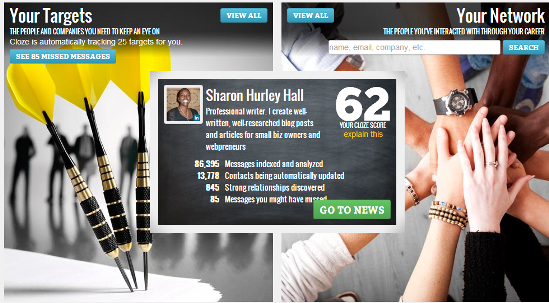
When you first go to Cloze, you get a homepage showing the number of missed messages you have and your Cloze score (which measures the quality of your relationships based on dormancy, frequency, responsiveness, privacy, freshness and balance) .
The home page also shows the number of messages and contacts being tracked and the number of strong relationships it has discovered.
Every contact also has a Cloze score based on their importance to and interaction with you. All you have to do is click on their name to get a detailed view of their interaction with you, their contact information, people related to them and recent messages.
In this example, my connection with this person is positively effected by how recently we have talked,
Cloze

The overall Cloze score is determined by a number of factors,
Cloze score
Catching Up
The next important page is the “what you may have missed” page.
On the left this shows your contacts and their updates, with options to share them, mark the update as read, or mute them. You can filter the view to see just emails and direct messages; just profile updates; just new connections and just shares and comments. And you can also change what you see for targets, muted targets and everyone else.

Cloze automatically suggests targets based on your interaction, but you can also mute or pin different targets so you get the tailored view you want. You can even choose whether to show personal relationships, coworkers, other relationships or everyone and can track up to 100 key relationships.
Reply and share options are appropriate for the original source. For email, clicking the paper plane button allows you to send a quick email or to send one of the message templates (call me, I’m on the road, or I’ll reply soon).
Here’s an example of the options available for a Twitter status update I missed,
cloze2
Cloze provides a great way to communicate with the people you want to reach from a single place.

Engagio

The third dashboard is Engagio.
Founded by William Mougayar, the site started as a social conversations network – a way to converse with others on social media without having to go to each site to find out what was happening.
That’s still at the heart of Engagio.
Sign up, add your accounts from 14 social networking sites and track your conversations either in a unified inbox or site by site. You can follow users and and see what they are talking about and even track the top people you interact with.
All of this happens in a Gmail-like inbox interface.
Click to enlarge
engagio
Transforming Relationships
At the start, the site aimed to let you transform your online interactions into relationships and recent changes have improved functionality and design.
Engagio tracks comments and discussions from 14 networks including
  • Twitter
  • Facebook
  • Google+
  • LinkedIn
  • Disqus
  • YouTube
  • StackExchange
  • StockTwits
  • Angel List
  • WordPress
  • Hacker News
  • Tumblr
  • Google Contacts
  • Foursquare
Engagio aims to end the fragmentation of the social web.
Engagio accounts
Discovering Engagement
At the heart of Engagio is the engagement discovery dashboard. On the left is a small navigation panel.
The middle shows discussions from people you are following, with a small icon indicating the network the update is on. Click on the update and a sub-menu appears to allow you to reply, share, follow, view, like or see the context. Some of these functions happen in-line, while others take you to the social media site to complete the action. And on the right of the dashboard, there are lists of sites and articles where your contacts are active.
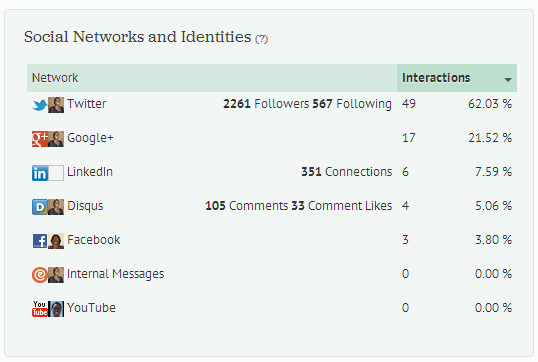
All users also have an editable profile which lists their networks, Klout score, links (pulled mainly from Google+), bio and recent discussions. You can also get an at-a-glance view of how active users are on the social networks they use, the top sites they comment on and the people they interact with most.
Other Engagio Features
Here are some of the other major features of Engagio:
  1. When you follow a user on Engagio, even if it’s just on one network, you can see everywhere that user is participating (as long as they are signed up for Engagio).
  2. Engagio has a new search feature. Look for conversations on a topic of interest and drill down to the people, articles and sites talking about it – this is an excellent research tool for writers and bloggers. You can even set up email alerts for your searches.
  3. Follow conversations and discussions from your Engagio dashboard – you don’t ever need to lose a conversation again.

Which Tool is Best?

So which engagement dashboard is right for you?
As always, it depends on your needs.
If you’re only using Twitter, then all you need is Commun.it. If you just need the biggest social networks, then Cloze has a lot to offer and since it’s still new you can expect more features to be added.
For me, as an active user of multiple social networks, Engagio is the best choice.